Getting Started with Your First WhatsApp Campaign
Ready to harness the power of WhatsApp for your marketing? Let's walk through setting up your first WhatsApp campaign with SleekSend. Follow these steps to connect your account and launch your campaign in no time!
Step 1: Connect Your WhatsApp Account
- Log in to your SleekSend dashboard.
- Navigate to the WhatsApp Hosts page.
- Click on the "Add Account" button.
Connecting Your WhatsApp
SleekSend makes it easy to link your WhatsApp account. Here's how:
- Click the "Add Account" button to display the QR code.
- Open WhatsApp on your phone and tap the "Link a device" option. Detailed tutorial on WhatsApp Link a device
- Scan the QR code displayed on the SleekSend dashboard.
Important: You only have 15 seconds to scan the QR code, so be ready!

Once scanned successfully, your WhatsApp account will be connected to SleekSend.
Step 2: Create Your WhatsApp Campaign
Now that your account is connected, let's create your first campaign:
- Go to the WhatsApp Campaigns page.
- Click on the "Bulk Chat" button to start a new WhatsApp campaign.
Step 3: Fill Out the Campaign Form
It's time to craft your campaign! Here's what the form looks like:
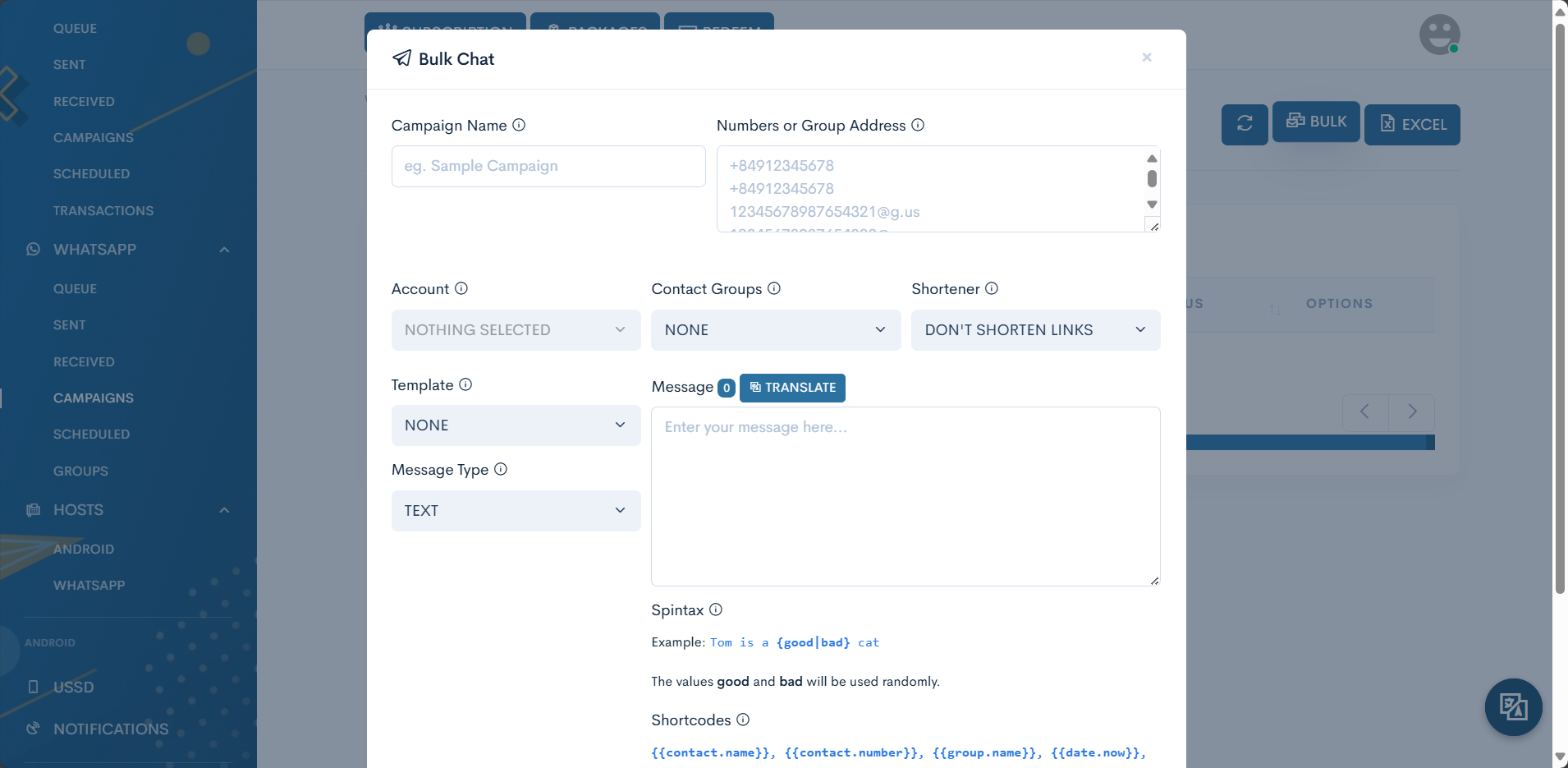
Let's break down each field:
- Campaign Name: Give your campaign a memorable name (e.g., "Summer Promo Launch").
- Numbers or Group Address: Enter recipient phone numbers or group addresses, one per line.
- For individual chats: Use the format +84912345678
- Account: Select the WhatsApp account you want to use for sending messages.
- Contact Groups: Choose from your pre-made contact groups or leave as "None" if using individual numbers.
- Shortener: Decide if you want to use a URL shortener for any links in your message.
- Template: Select a pre-made template or create a new one.
- Message Type: Choose the type of message you want to send (text, image, video, etc.).
- Message: Type your WhatsApp message content here. Keep an eye on the character count!
Pro Tips for Your Message:
- Spintax: Use {option1|option2} format for text variations. Example: "Our {amazing|incredible} offer is live!"
- Shortcodes: Personalize your messages with codes like
{{contact.name}}or{{date.now}}.
Step 4: Review and Send
Before launching your campaign:
- Double-check all your settings and message content.
- Consider sending a test message to yourself first.
- Ensure your WhatsApp account is properly connected and active.
Step 5: Launch Your Campaign
You're all set! Click the "Send" button and watch your WhatsApp campaign take off. 🚀
What's Next?
- Monitor your campaign's performance in the SleekSend dashboard.
- Analyze response rates and engagement to refine your future campaigns.
- Explore advanced features like automated responses or integrating with your CRM.
Remember, WhatsApp marketing is all about building relationships. Use SleekSend to create personalized, engaging conversations with your audience!
Need assistance? Our support team is always ready to help at support@sleeksend.center.
Happy messaging! 📱💬