Managing Your Contacts in SleekSend
Effective marketing starts with a well-organized contact list. In this guide, we'll walk you through creating contact groups and adding contacts to your SleekSend account, both individually and in bulk.
Creating Contact Groups
Organizing your contacts into groups makes it easier to target specific audiences. Here's how to create a new group:
- Navigate to the Contact Groups page.
- Click on the "Add Group" button.
- In the popup window, enter a name for your group (e.g., "Friends", "Loyal Customers", "Newsletter Subscribers").
- Click "Save" to create the group.
Pro Tip: Create groups that align with your marketing segments for more targeted campaigns.
Adding Contacts
Method 1: Adding Contacts Individually
For adding contacts one by one:
- Go to the Saved Contacts page.
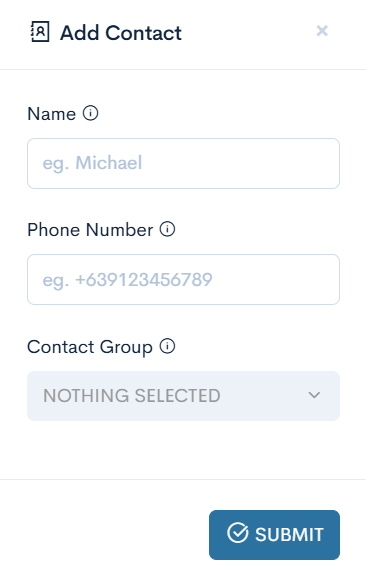
- Click on the "Add Contact" button.
- Fill in the contact details:
- Name: Enter the contact's name (e.g., Michael)
- Phone Number: Enter the phone number with country code (e.g., +84912345678)
- Contact Group: Select the appropriate group from the dropdown (optional)
- Click "Save" to add the contact.
Method 2: Importing Contacts in Bulk
For adding multiple contacts at once:
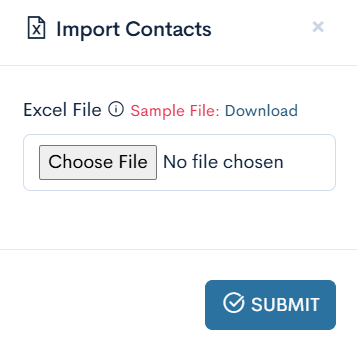
- On the Saved Contacts page, click "Import Contacts".
- In the popup window, you'll see an option to upload an Excel file.
- If you don't have a prepared file, download the sample file provided by clicking "Download" next to "Sample File".
- Prepare your Excel file with columns for Name, Phone Number, and optionally, Group.
- Click "Choose File" and select your prepared Excel file.
- Click "Import" to add the contacts to your account.
Pro Tip: Before importing, ensure your Excel file follows the format of the sample file to avoid any import errors.
Best Practices for Contact Management
- Regular Updates: Keep your contact list fresh by regularly updating information and removing inactive contacts.
- Segmentation: Use groups effectively to segment your audience for more targeted messaging.
- Data Privacy: Always ensure you have permission to contact individuals and comply with local data protection laws.
- Backup: Regularly export your contacts as a backup to prevent data loss.
What's Next?
Now that you've set up your contact groups and added contacts, you're ready to start creating targeted campaigns! Head over to our SMS or WhatsApp campaign guides to put your contact list to work.
Need help with contact management? Our support team is here for you at support@sleeksend.center.
Happy organizing! 📇🚀